Special Offer




How to Install GNURadio on Kali Linux



When you want to install GNURadio on Kali Linux, it can feel a bit overwhelming at first, but it’s actually much simpler than it seems. When I first started experimenting with software-defined radios, I had no idea where to begin. That’s where GNURadio comes in. It’s an open-source toolkit that lets you play with radio signals right from your Linux machine. You can receive signals, decode them, or even build your own little radio experiments, without buying any special hardware.
On Kali Linux, setting up GNURadio is straightforward, and once it’s running, you can dive straight into exploring signals and building flowgraphs. In this guide, I’ll walk you through the exact steps I use so you can start experimenting immediately.
Install GNURadio on Kali Linux
After introducing you to GNURadio in the previous section, now we want to teach you how to install GNURadio on Kali Linux. Installing GNURadio is not difficult, just follow the steps below. In the first step, update your service packages with the help of the following command:
sudo apt update
You can install GNURadio using the following command:
sudo apt install gnuradio
Wait until the installation of GNURadio gets complete. You will see a terminal notification after the entire process is complete.
Example Project: Quick Flowgraph
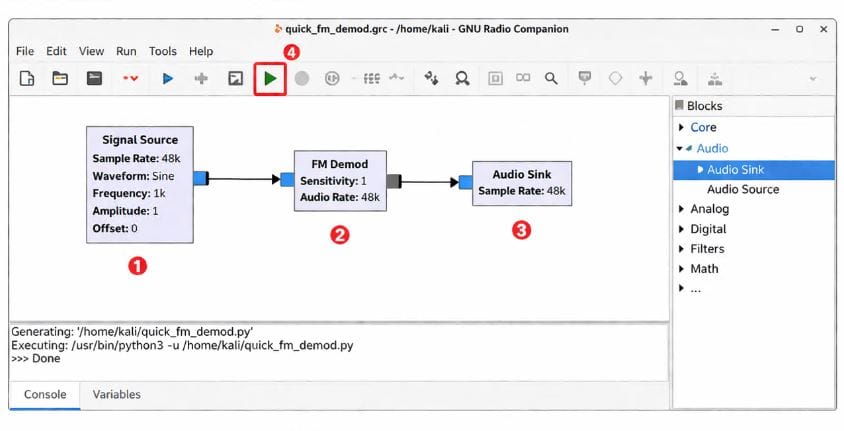
When I first tried GNURadio on Kali Linux, I just dragged a Signal Source block (sine wave) to the canvas, connected it to an FM Demod, then to an Audio Sink. Hit run… and I actually heard it!
Start simple like this: tweak the frequency or add a filter, see what happens, and don’t worry if it breaks. This is how you really learn GNURadio.
How to Use GNURadio on Kali Linux
If you want to create GNURadio signal flowgraphs, you can use the GNURadio Companion graphical tool:
gnuradio-companion -h
To display the details of the installed GNURadio, enter the following command:
gnuradio-config-info -h
You can use the following GUI to create filters for GNURadio:
gr_filter_design -h
Tips and Troubleshooting
Okay, so here’s the stuff I messed up the first few times I installed GNURadio on Kali Linux, maybe it’ll save you some headaches.
Always update first. I skipped it once and nothing wanted to install. Just run sudo apt update && sudo apt upgrade and breathe easy.
Dependencies are tricky. If GNURadio Companion refuses to open, it usually means some Python library is missing. I spent like 20 minutes hunting for that one…
Hardware can be stubborn. USB RF devices sometimes don’t get recognized immediately. Make sure it’s plugged in properly and you have permissions. I’ve been there.
Flowgraphs won’t work? Don’t freak out. I’ve had mine do nothing for a solid hour just because one tiny block wasn’t connected. Fix it, rerun it, learn something.
Performance tips. GNURadio can be hungry. Keep things simple at first, close extra apps, and your flowgraphs will run smoother.
Honestly, the best way to learn is to click around, break stuff, and fix it again. If it feels confusing at first, that’s totally normal.
Conclusion
So… that’s it, I guess. GNURadio is finally up on my Kali Linux, and honestly, I didn’t know what half of it did the first time I opened it. I spent a few hours just clicking around, trying random things, and somehow got my first flowgraph to actually run, it was kind of magical.
If you’re doing this too, just dive in, don’t stress if things break, and mess around until something works. That’s how I learned most of it. Honestly, it’s way more fun than I expected.