How to Install and Use DirBuster on Kali Linux



DirBuster on Kali Linux is a tool many people use when they want to see whether a website has directories or files that are not visible through the normal pages of the site.
It works with a wordlist and simply tries different names against a target website. By watching how the server responds, you can often tell if a directory or file actually exists.
Because DirBuster has a graphical interface, it’s easy to run scans without relying entirely on terminal commands. Kali Linux already includes the tool, so you can usually open it from the menu and start scanning right away.
What Is DirBuster And How It Works On Kali Linux?
A website doesn’t always show everything that exists on its server. Sometimes directories or files are there but simply aren’t linked anywhere on the site.
DirBuster is used to look for those paths. It’s included in Kali Linux and comes with a graphical interface, so you can run a scan without dealing with many command-line options.
You give the tool a target website and a wordlist. It then tests different names and checks the server’s response.
DirBuster vs Gobuster vs DIRB
When looking for hidden directories on a website, there are several tools you can use. DirBuster, Gobuster, and DIRB are among the most common ones, and each has its own style.
DirBuster comes with a graphical interface, which makes it easier for people who prefer not to work only in the terminal.
Gobuster is a command-line tool known for its speed and is often used for faster scans.
DIRB is another simple command-line tool that works with wordlists to discover directories on a web server.
| Best For | Speed | Interface | Tool |
| Beginners | Medium | GUI | DirBuster |
| Large scans | Fast | CLI | Gobuster |
| Simple scans | Medium | CLI | DIRB |
How to use DirBuster on Kali
There are 2 ways to start the DirBuster application.
1- Start with the DirBuster icon: You can search and type “DirBuster” in the menu of Kali Linux. Then click on the icon and let the app start.
2- Start with the Terminal: You can also start DirBuster with the terminal by running the command below:
dirbuster
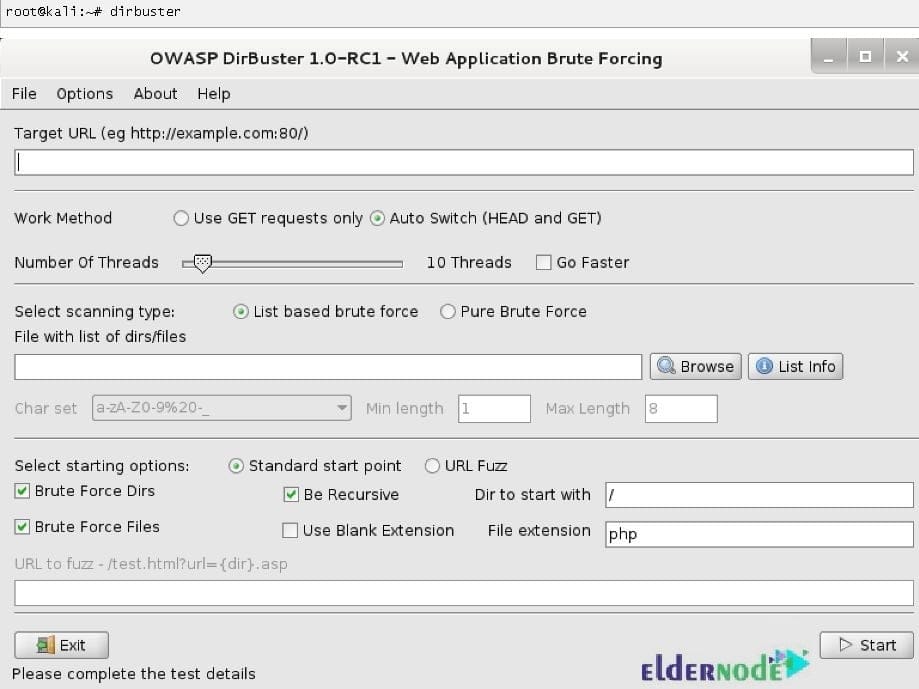
Using both above methods will show you a user interface that allows you to list files and directories from a Web URL in port 80. Once the DirBuster starts, you should continue the below steps:
1- Set target URL and number of Threads
2- Select a list of possible directories and files
3- Start brute force scan
4- Generate the report (optional)
DirBuster Features
Additional to the above explanations about DirBuster, there are more benefits to use this simple but powerful tool.
1- Workover HTTP and HTTPS
2- Scans for both files and directories
3- Scan recursively into the directories it identifies, providing more in-depth searches
4- The ability to start on any directory
5- The ability to perform brute force or a list-based scan
6- Perform brute force scans at super high speeds
7- Provide its own collection of wordlist
8- Allow users to make their own wordlist
DirBuster Disadvantages
Like any other tool, DirBuster showed some behaviors that users reported as its negative points. let’s have a look:
– Too noisy
– Service may disturb with an extensive amount of requests
– Brute force may be stopped when there are many error responses
Install DirBuster On Kali Linux Step By Step
DirBuster comes by default with Kali Linux. You just need to run the following command to install DirBuster and any other packages on which it depends:
sudo apt-get install dirbuster
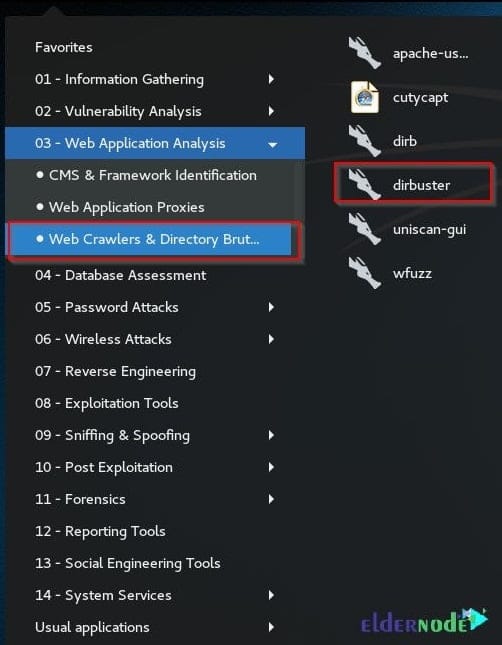
In this way, you can launch DirBuster from the Kali Linux with the below path:
Web Application Analysis >> Web Crawlers and Directory Brute >> Dirbuster
How to uninstall DirBuster on Kali
Any time you decided to uninstall DirBuster, you can run the following command to remove just the DirBuster package itself.
sudo apt-get remove dirbuster
But if you wish to remove the DirBuster package and any other dependant packages which are no longer need, type:
sudo apt-get remove --auto-remove dirbuster
You can also remove DirBuster’s local configuration files using the command below. Keep in mind that once these files are deleted, reinstalling the package will not bring them back, so make sure you really want to remove them before running the command.
sudo apt-get purge dirbuster
Or similarly, like this DirBuster
sudo apt-get purge --auto-remove dirbuster
Conclusion
DirBuster is often used to discover directories or files on a website that are not visible through normal navigation. Since it is already included in Kali Linux, it can be launched directly and scans can be started using a wordlist.
As with other penetration testing tools, it should only be used on systems that you are authorized to test.