How to Install BBQSQL on Kali Linux for Blind SQL Injection



BBQSQL is a Python-based framework for testing blind SQL injection, known for its speed and efficiency. When dealing with SQL injection vulnerabilities, this tool becomes very handy. It’s particularly useful for finding those hard-to-trigger vulnerabilities, and you can easily customize it to suit your needs. BBQSQL is open-source under the BSD License, with an intuitive user interface that makes setting up attacks much easier. This article will guide you through installing and using BBQSQL on Kali Linux. If you’re setting up your own Linux VPS, Eldernode offers top-quality Linux VPS packages, perfect for professionals.
How BBQSQL works (BBQSQL On Kali Linux)
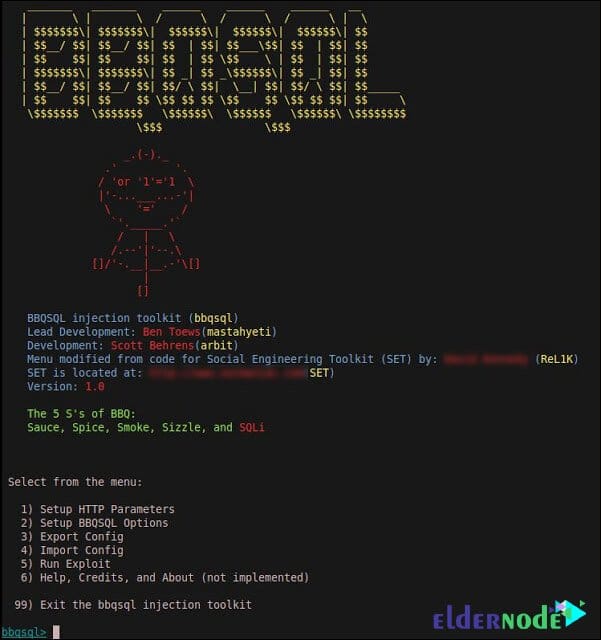
The injection works on URL, data, and cookies. Since BBQSQL UI is built using the resource from SET, you do not have to wait until you type a huge request on the command-line interface. You can be sure of input validation performing on all configuration options.
You will see the below screen when you work with BBQSQL:
Install BBQSQL On Kali Linux step by step
Run the following command to install BBQSQL and all dependent packages on Kali Linux.
sudo apt-get install bbqsql
Dependencies to install BBQSQL on Kali Linux
To install Python on kali, type:
sudo apt-get install python
Also, you can install python-gevent by running the following command:
sudo apt-get install python-gevent
And to install python-requests, type:
sudo apt-get install python-requests
How to uninstall BBQSQL from Kali Linux
You may decide to uninstall BBQSQL from Kali Linux due to any reason. You just need to run the following command and remove just the BBQSQL package itself.
sudo apt-get remove bbqsql
In case you prefer to uninstall BBQSQL and its dependencies, use the command below and remove the BBQSQL package and any other dependant packages which are no longer needed.
sudo apt-get remove --auto-remove bbqsql
Also, if you wish to delete your local/config files for BBQSQL, run the following command, and Do not forget that you will not be able to restore Purged config/data even by reinstalling the package.
sudo apt-get purge bbqsql
Or similarly like this BBQSQL
sudo apt-get purge --auto-remove bbqsql
Conclusion
We’ve covered how to get BBQSQL up and running on Kali Linux and how it can make finding blind SQL injection flaws a lot easier. It’s a solid tool for anyone needing to test security, and its simple interface lets you run tests quickly. BBQSQL helps you ask the database basic true/false questions, saving you time and effort. If you’re into security testing, BBQSQL is a tool that can really come in handy.