How to Install JSQL Injection on Kali Linux (Step-by-Step Guide)



JSQL Injection is often the first thing people run when they want a quick answer about SQL injection risks. You point it at a target, run a scan, and see if anything obvious comes back before wasting time on manual testing. This article only covers how to install JSQL Injection on Kali Linux and verify that it works correctly from the terminal.
What JSQL Injection Does in Practice
JSQL Injection is a CLI-based tool used to poke at a web application and see how it behaves when database input looks wrong. You don’t use it to prove anything fancy at first just to get a quick signal on whether SQL injection is even worth looking into.
It runs from the terminal, sends its own requests, and shows you how the target responds. If nothing interesting shows up, you move on. If it does, then manual testing starts.

Where JSQL Injection Fits in Security Testing
Useful for quick checks before manual testing.
It saves time when you’re dealing with the same checks over and over.
You still have to review the results yourself before trusting anything.
The Best way to Install Kali Linux for JSQL Injection
If you already have Kali Linux running, you can skip this part. Any standard Kali installation works fine for running JSQL Injection, whether it’s on bare metal, a virtual machine, or a test VPS.
Install JSQL Injection on Kali Linux
First Update the System Repositories using the command below:
sudo apt update
Then run the following command to Install JSQL Injection:
sudo apt install jsql-injection
After the installation is complete, you can use the tools of JSQL as follows:
Basic JSQL Injection Setup and Commands
Once you have downloaded JSQL Injection, you need to configure it. To do this, follow these steps:
Open a terminal window and change to the JSQL Injection directory:
cd ~/Downloads/jsql-injection
Compile the JSQL Injection source code by running the following command:
javac -cp lib/*:. JSQLInjection/*.java
Run JSQL Injection by executing the following command:
jsql-injection -h
JSQL Injection will start, and you will see the command line interface.
You can use JSQL by running the command below:
jsql -h
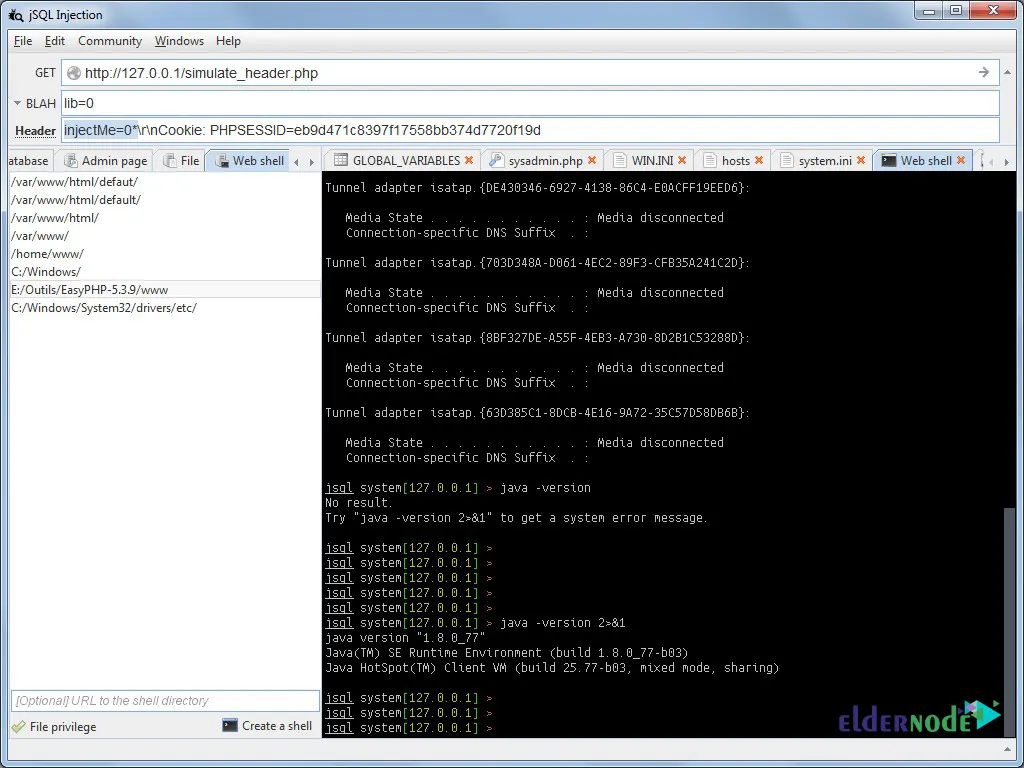
Here is the JSQL Injection environment:
Security Notes and Testing Boundaries
Never trust user input in database queries.
Use parameterized queries instead of raw SQL.
Test regularly, especially after code changes.

Note : For lab environments, running Kali Linux on a VPS can be useful when testing tools like JSQL Injection remotely.
Usage Notes and Limitations
- Use JSQL Injection only on systems you own or have permission to test.
- The tool is best suited for quick checks, not full audits.
- Manual testing is still required for reliable results.