Special Offer




How to Connect two Proxmox Servers



Connecting two Proxmox servers is where things start to feel less like “two machines” and more like one shared system.
Instead of logging into each server separately and thinking about them in isolation, you bring them together so they can work as a single environment. From there, virtual machines can move between nodes when needed, which makes maintenance a lot less painful.
It also gives you some breathing room when something goes wrong. If one server becomes unavailable, the other can keep things running depending on how you’ve set up the cluster.
For most setups, this is the moment Proxmox stops being just a virtualization tool and starts becoming real infrastructure you can rely on and expand.
Understanding Proxmox Clusters
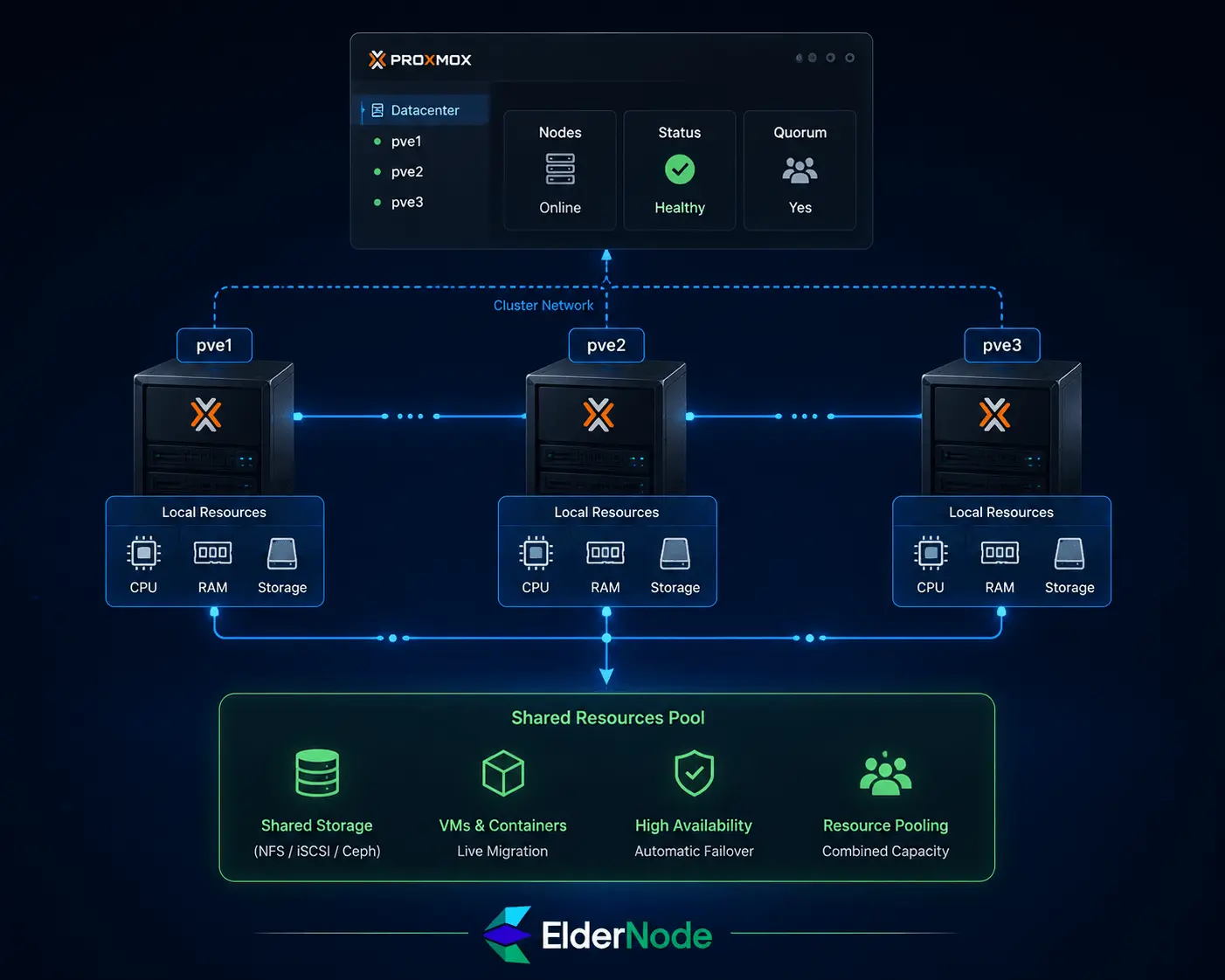
Proxmox clusters are basically a way to stop thinking about servers as separate boxes.
Once you connect them, they behave like one system. You don’t log into “server A” or “server B” anymore, you just manage the cluster and place workloads where they make the most sense.
High Availability (HA) is the part that actually matters in real life. If one server goes down, the running virtual machines don’t just sit there and die with it. They get brought up on another node so things keep going.
In practice, it changes how you work:
You can shift workloads around before doing maintenance
One machine failing doesn’t automatically mean everything is offline
Resource usage becomes more flexible instead of fixed
It all works because the nodes constantly talk to each other and keep track of what’s running where.
When it’s set up properly, it doesn’t feel like “two servers connected” anymore. It just feels like one pool of resources you can use however you want.
Preparing Your Proxmox Servers
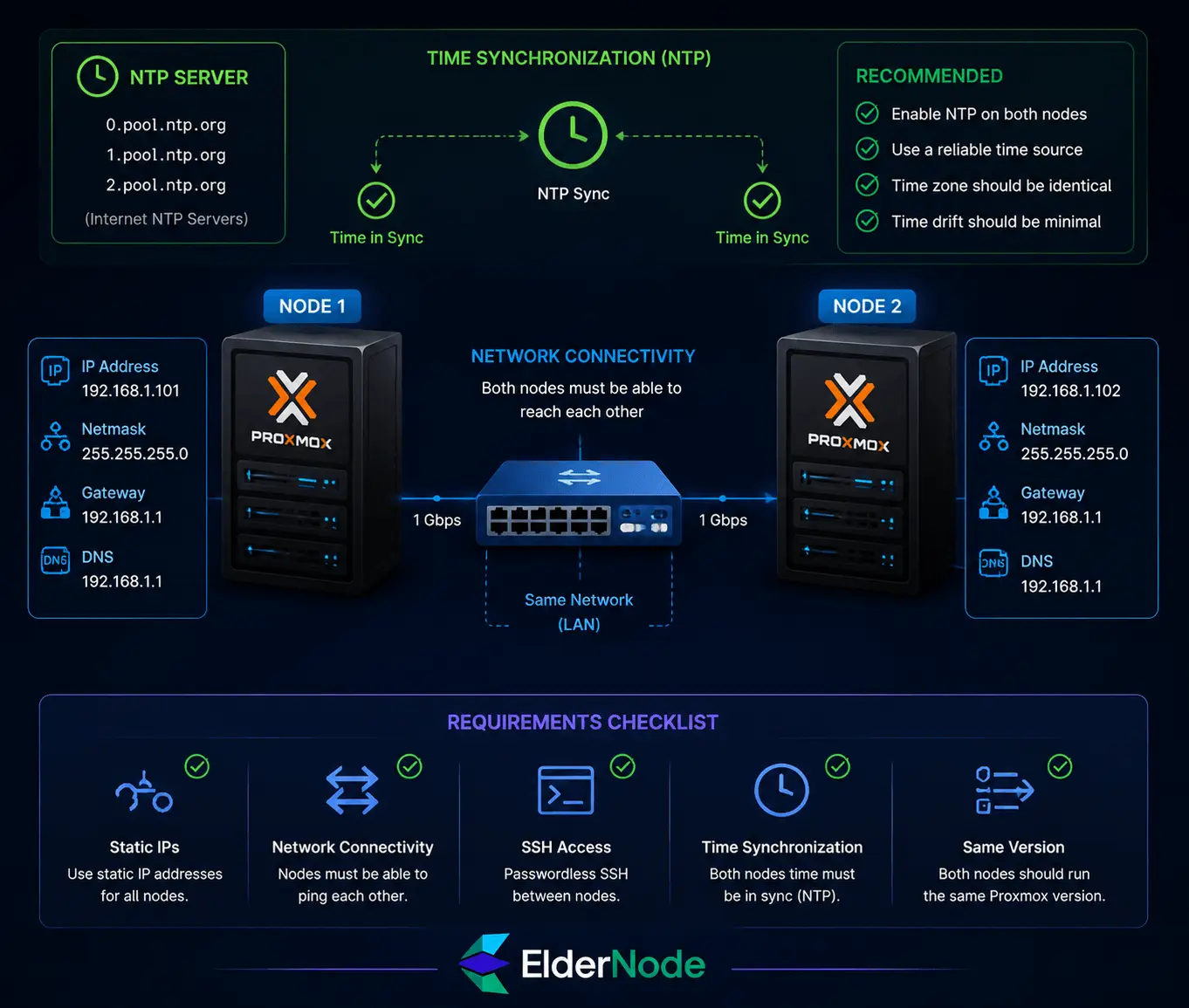
Before you connect two Proxmox servers, there are just a few things that actually need to be ready on Linux VPS.
They should be on the same network and use static IPs so nothing changes unexpectedly. SSH needs to work between them because Proxmox relies on it during setup.
Make sure both servers are in sync time-wise (NTP on), and that they’re running the same Proxmox version. That’s usually where most problems come from if anything goes wrong.
If these basics are fine, the cluster setup is usually straightforward.
Connecting Two Proxmox Servers
Connecting two Proxmox servers isn’t complicated, but the order matters.
First, make sure both servers can actually talk to each other. Same network, static IPs, and no surprises with routing. If they can’t reliably ping each other, don’t even start the cluster part yet.
SSH should already work between the nodes. If you can’t log in from one server to the other, Proxmox won’t be able to build the cluster either.
Update both servers so they’re on the same Proxmox version. Mismatched versions are a common reason things fail later.
Then the actual setup is pretty straightforward:
On the first node:
pvecm create mycluster
On the second node:
pvecm add <IP_of_first_node>
After that, check everything:
pvecm status
If something breaks, it’s usually one of three things: network issues, SSH problems, or version mismatch. Fix those, and the rest usually falls into place.
Initial Network and Time Configuration
This part is really just about getting the basics right before touching the cluster.
Both servers should have static IPs and be able to reach each other without any network issues. If connectivity isn’t stable, nothing else will behave properly later.
Time sync matters more than it looks. Enable NTP on both machines so their clocks stay aligned.
At minimum, make sure:
- Static IPs are set
- Servers can reach each other over the network
- NTP is running on both nodes
If these are in place, the rest of the setup becomes much smoother.
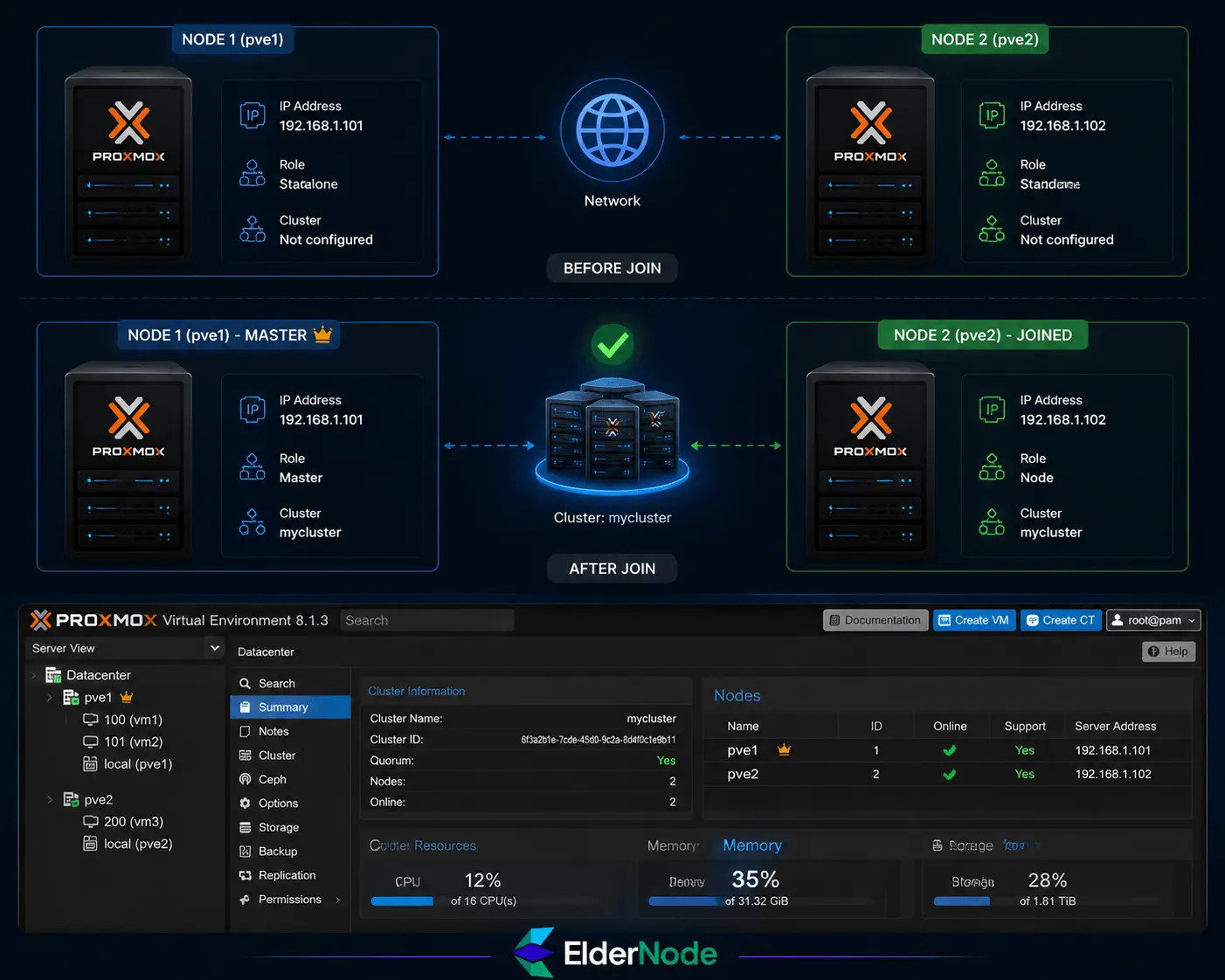
Creating and Joining the Cluster
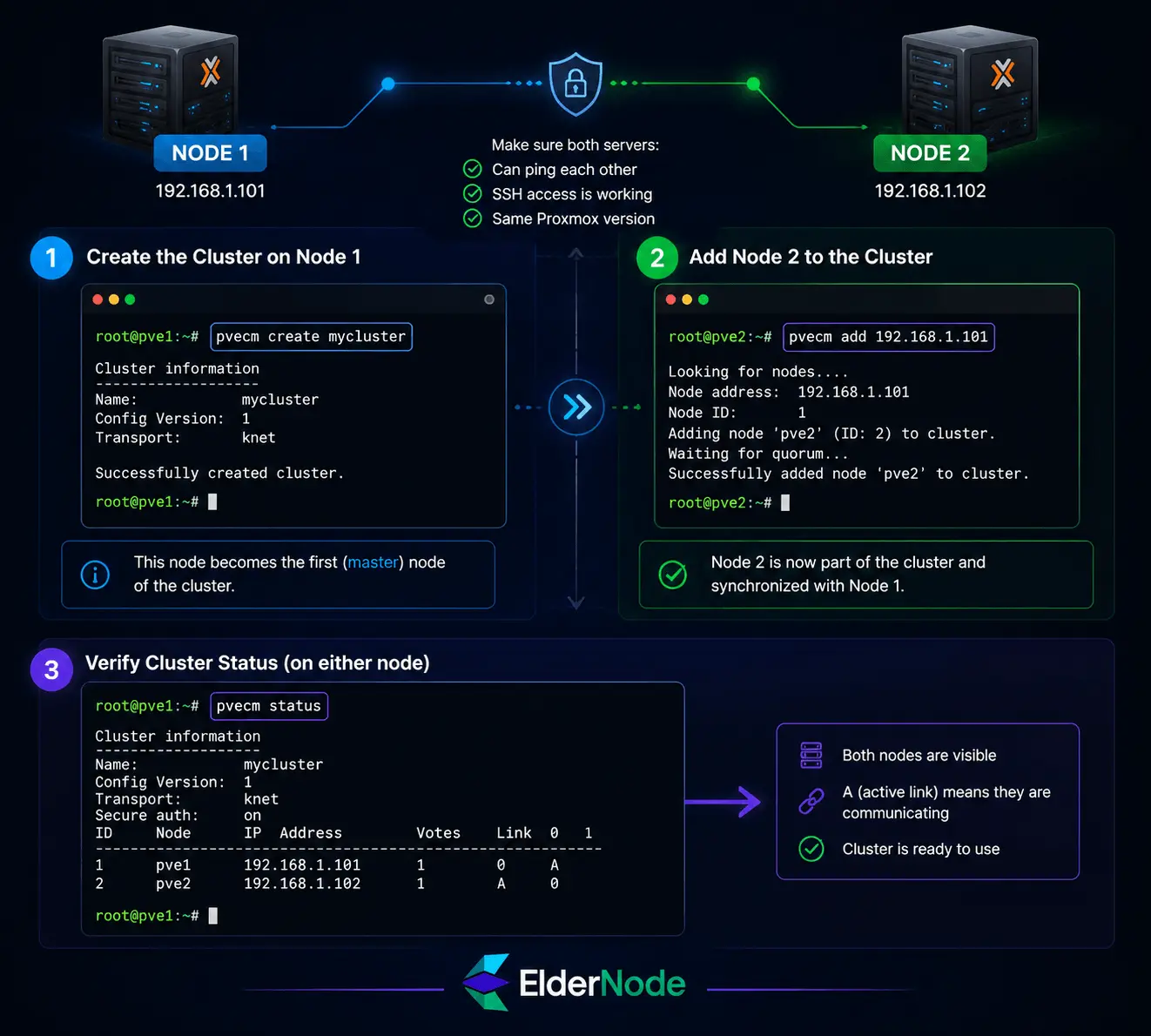
On the first server, you create the cluster:
pvecm create mycluster
That basically sets this node as the starting point.
On the second server, you join it to that cluster:
pvecm add <IP_of_first_node>
After that, both servers should appear under the same cluster.
Quick checks:
- First node: cluster created successfully
- Second node: joined without errors
- Both nodes visible in cluster status
Once that’s done, they’re no longer separate servers.
Verifying Cluster Status and Troubleshooting
You can check the status with:
pvecm status
After you’ve joined the nodes, this is the first thing you run to see if everything actually held together.
You just want to confirm both servers are showing up and communicating properly.
If something is wrong, it’s usually pretty straightforward:
- The node didn’t join correctly (often IP or SSH issue)
- Network between servers isn’t stable
- Version mismatch between Proxmox nodes
Fix those, then run the status check again.
Once everything looks clean, the cluster is basically ready and you can move on to things like HA or workload migration.
Fixing these usually resolves 90% of cluster problems.
Best Practices and Maintenance Tips
Maintenance in a Proxmox cluster doesn’t need to be complicated, it just needs to be consistent.
The most important thing is keeping all nodes on the same Proxmox version. If one server gets updates and the others don’t, you’ll eventually run into strange issues.
Backups are non-negotiable. Make sure both your VMs and key configuration files are backed up regularly, not just when you remember.
And every now and then, just check the basics:
Are all nodes online and visible in the cluster?
Is CPU, RAM, or disk usage unusually high anywhere?
Is the network between nodes stable?
That’s usually enough. If you keep these things in check, the cluster tends to stay stable without much extra effort.
Conclusion
Connecting two Proxmox servers basically turns two separate machines into one system you can manage together.
Once they’re in a cluster, you get more flexibility with how you use resources, and you’re not stuck relying on a single server for everything. If one node goes down (depending on your setup), the other can keep things running.
The main benefit shows up in day-to-day use: maintenance becomes easier, workloads are more flexible, and the whole setup is more resilient than a single server.
If the network, time sync, and cluster configuration are done properly, the system usually runs smoothly without much extra effort.